How Stephen Gould Scaled Its Capacity by 30% without Making a Single Hire

Slingshot is the all-in-one digital workplace enabling teams to organize their files in one spot instead of wasting hours hunting for key business documents. Intuitively upload, pin, access, and arrange all assets, files, and resources so they live in the context of your teams and projects.
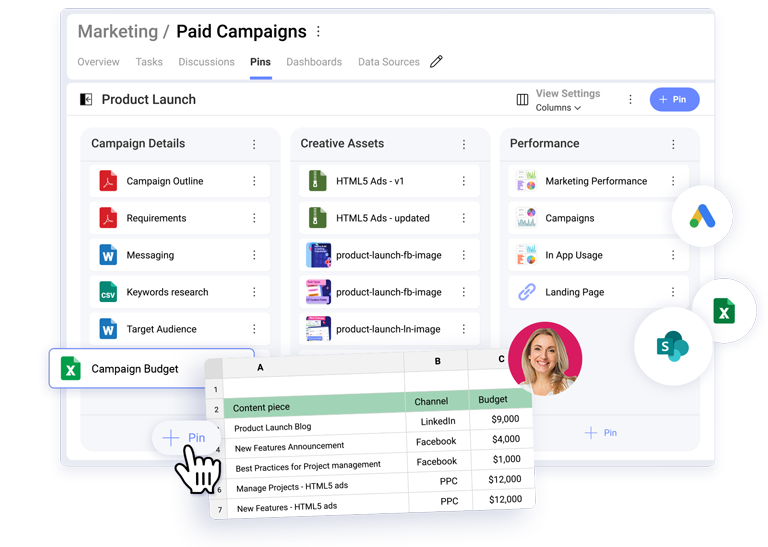
Wave goodbye to the endless searching and navigating in too many places to find your content. Bring all your assets, briefs, resources, and documents together into structured, contextual views. Projects and assets of any kind, for any role, are easily accessed in Slingshot – designers, content writers, SEO specialists, product managers, and can all upload, pin and access their files in a structured way. All feedback files, briefs, copy docs, product development updates, comments, and conversations stay in one place, allowing for easy collaboration with multiple people at the same time.
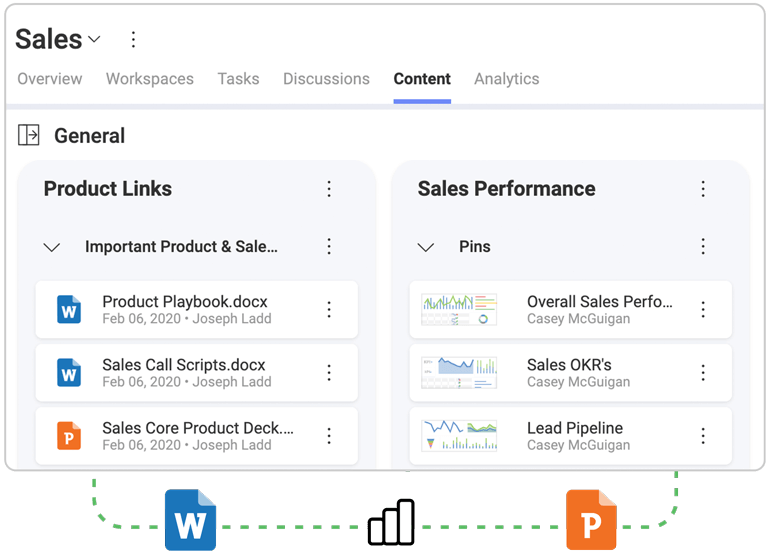
Trust Slingshot to help your team excel in their roles, reassured that they always have the most updated files. In Slingshot, file management is more than just accessing the latest doc for a task. You can create a chat, discussion, dashboard, or task directly from pinned content with a single click.

Easily manage, share and access files and documents with your team in the same place collaboration happens.

Bring all your content together in your organized digital workplace, regardless of where your files are currently stored. We offer robust integration with OneDrive, Google Drive, and Dropbox.

Turn content into a shared, living, and breathing file management – upload local files from your file explorer or simply drag and drop them into Slingshot.

Go beyond uploading content. Pin URL links directly into Slingshot in tasks, projects, and workspaces, and keep all tools and resources at your fingertips.

Set file permissions on your content so you can manage different team members’ access to specific files and documents.
File management is the process of storing, organizing, accessing, and sharing digital files. This can include folder organization, grouping per project, function, and team, sharing with relevant people, and working together or updating the same file.
File management, when done right, saves every team valuable time in their project management, helps them share valuable insights faster, give each other feedback, and access company assets in one organized place. With file management, everyone is able to quickly find whatever document and file they are looking for to do their work.
A document management system is used to track and store digital files and documents in an organized way. It is the digital replacement of a paper-based file organization system that allows for much quicker and easier access to the relevant files by specific people and teams in an organization.
A document management system creates uninterrupted usage and access of shared documents, usually within one and the same organization or company. It functions like a unified hub for key files and helps the workflow to run smoothly.
In Slingshot, you can separate your teams, projects, and even departments in workspaces and store all of your files and documents contextually there. It’s the only hub your team needs for bringing all their needed content together – from any cloud storage like Google Drive, OneDrive, Sharepoint, Box, or DropBox (see the entire list), it allows for a direct upload and pinning of every relevant link. When a team is working within a specific workspace – for a project, event, campaign, etc. – every person in the team can find all the necessary files at a drop of a hat and stay efficient with their time. You can collaborate in context and make faster, data-driven decisions while storing all of your files in one place and being able to set permissions to specific workspaces to external collaborators.